
How customers opt in to text messages
ARCS Parking sends a text message only when the customer asks for one — either by texting us first, or by pressing “Text” at a kiosk. This page documents both consent paths end to end.
Two opt-in methods, both customer-started. We never message a number that has not asked us to.
- Text to Park — consumer-initiated. The customer reads a sign in the parking facility and texts PARK to our number. Sending that first message is the consent. We reply once, to that number only. The sign is reproduced below.
- Text to Pay — on-screen web form. Consent is collected through an on-screen web form presented on the touchscreen of our payment kiosks rather than in a browser on the customer's own phone, because the customer is standing at the equipment at the moment of the transaction. It is the same thing in every other respect: the customer reads the on-screen disclosure, makes a selection, and types their mobile number into an on-screen field. The screenshots further down are that form.
Text to Park — the sign the customer reads
This is the signage displayed in the parking facility. The customer reads the disclosure on it before sending anything, and sending the message is the act of consent. Nothing is sent to a number that has not texted us first.
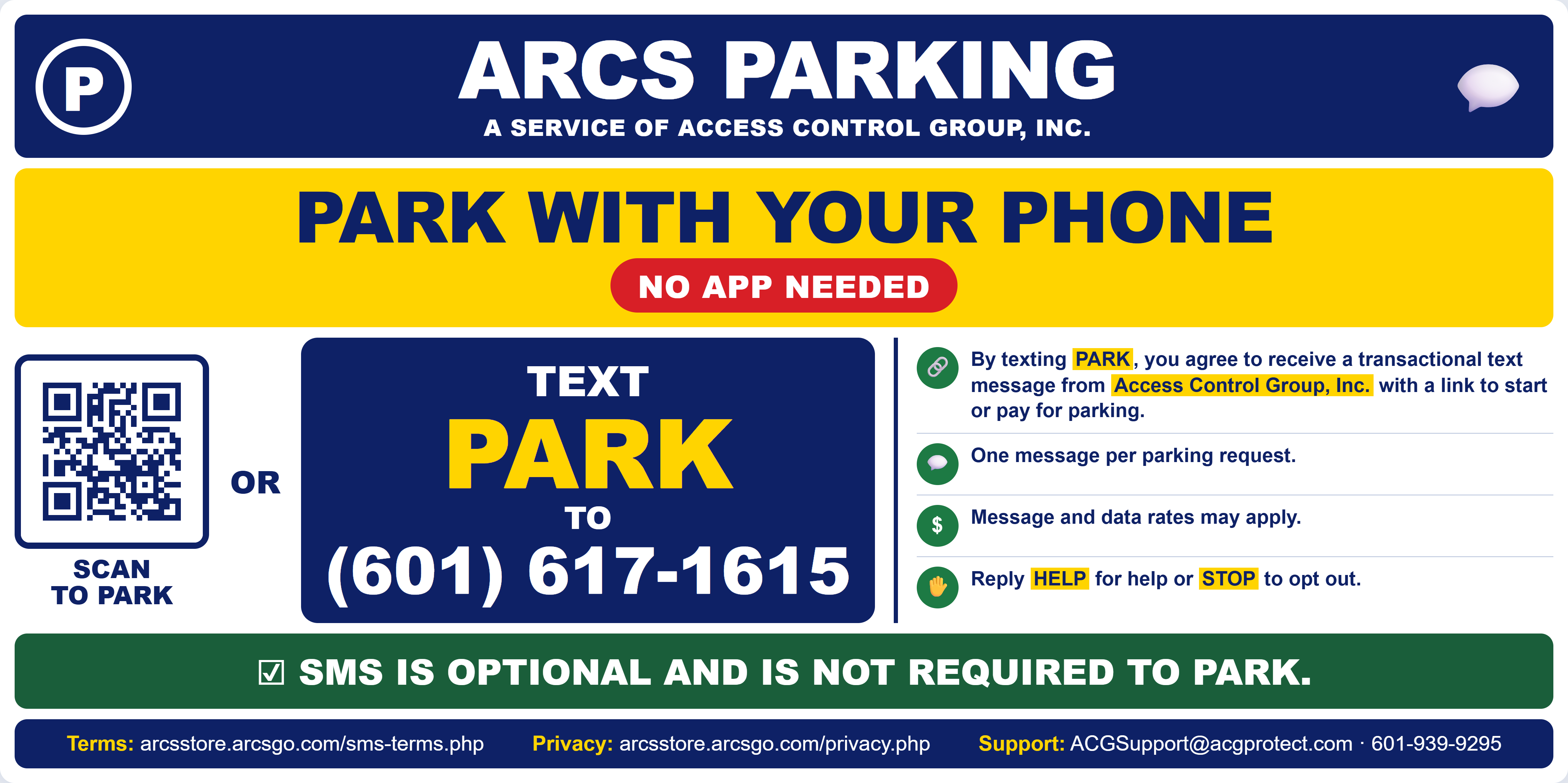
The sign states, before the customer texts: what they will receive, who from, that it is one message per parking request, that message and data rates may apply, how to get help, how to opt out, and — prominently — that SMS is optional and is not required to park. It also links to these terms and to our privacy policy.
The same sign carries a QR code, and the identical parking service is available at the kiosk and in the ARCS Parking app, so a customer who never texts parks exactly as any other customer does, at the same price.
- What we reply
- One message: a link to start or pay for parking. If the customer texted a lot code from the sign, the link opens that lot.
- Reply to HELP
- Our support email address and telephone number, and how to opt out.
- Reply to STOP
- No further messages to that number, immediately and automatically.
- Unsolicited messages
- None. The system only ever replies; it cannot originate a message to a number that has not texted us.
Text to Pay — the kiosk
The remainder of this page documents the second path: the on-screen form at our payment kiosks.
- Program
- ARCS Parking — Text to Park, and parking tickets and receipts (Text to Pay)
- Operated by
- ARCS Parking
- Scope
- This number sends only the two kinds of message described on this page: a reply to a customer who texted us, and the kiosk ticket and receipt messages. It is not used for marketing, for promotional messaging, or by any other system.
- Message type
- Transactional. One message per parking request or transaction.
- Frequency
- Only in response to the customer — one reply per message they text us, or one message when they select “Text” at the kiosk (typically one on entry and one on exit). No recurring, promotional or marketing messages are ever sent.
- Cost
- Message and data rates may apply.
Consent to messaging is never required to use our service
No text message is ever sent unless the customer asked for it first — either by texting us, or by pressing “Text” on the kiosk. Those two acts are the only opt-ins that exist. At the kiosk, “Print” and “No Receipt” sit beside “Text” and are always available.
Nothing about the parking service — entry, exit, pricing, payment or proof of payment — is withheld from, or made more expensive for, a customer who declines text messages. A customer who never texts us and never presses “Text” parks exactly as any other customer does, at the same price, using the QR code on the sign, the kiosk or the app, and receives a printed receipt at no cost. We offer no discount, credit or benefit in exchange for agreeing to receive texts.
Where a phone number is used to enter a facility, it is an access credential, not consent to messaging. Some of our sites are equipped for phone-number entry rather than printed tickets. At those sites the number opens the gate and identifies the parking session, exactly as a ticket number would. It is held for access control and billing only, and it is never messaged unless the customer separately presses “Text” at the kiosk.
Where the opt-in happens
The web form is displayed on the kiosk touchscreen in the parking facility, at the moment of the transaction. It is not hosted on a public marketing page, because the message being offered is the receipt for the transaction the customer is completing right then, standing at the machine. There is no mailing list and no separate subscription page — the form exists only at the point of sale.
Every customer is presented with three choices and must actively pick one. Nothing is pre-selected. A customer who chooses “Print” or “No Receipt” is never sent a message, and if we do not already hold their number it is never requested.
Whatever the customer chooses, the parking transaction completes identically. A printed receipt is always available at no cost, so declining messages costs the customer nothing and withholds nothing from them.
How a customer enters the facility
Our sites are equipped differently. In every case, no message is sent unless the customer presses “Text”:
- Printed ticket. The customer takes a ticket on entry. No phone number is captured at any point. If they later want their receipt by text, pressing “Text” prompts them to type their number; otherwise no number is ever requested.
- Phone-number entry. At sites equipped this way, the customer enters their mobile number to open the gate. The number is the access credential and the parking-session identifier, in place of a ticket number. It is used for access control and billing. Providing it is not consent to messaging, and no message is sent to it unless the customer presses “Text” at the kiosk.
Whichever way a customer entered, the kiosk presents the same three choices at the end of the transaction, and a printed receipt is always available at no cost.
Step by step
- The customer arrives at the kiosk. On entry they either enter their phone number as their credential, or pull a printed ticket. On exit they pay for their stay.
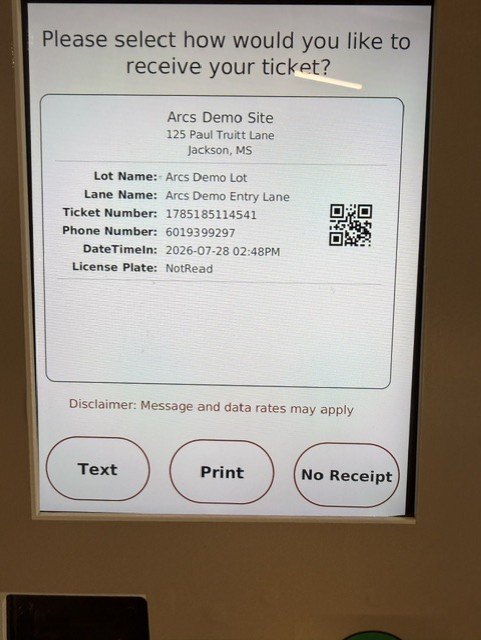
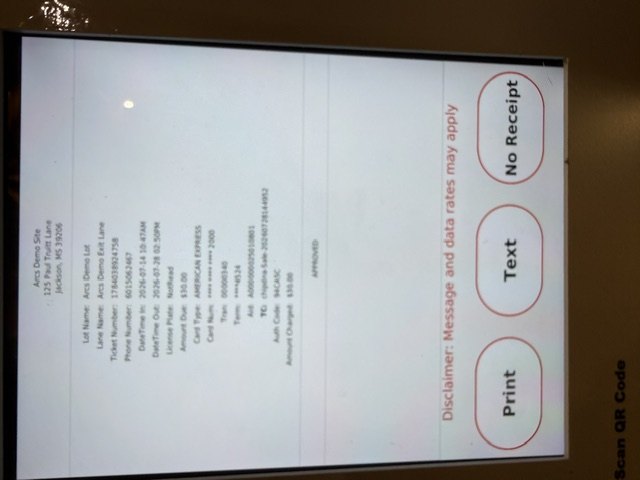
- The kiosk asks how they want their ticket or receipt. The screen shows the transaction details and three buttons: Text, Print and No Receipt. The disclosure “Message and data rates may apply” is displayed on this screen, before any selection is made.
- Pressing “Text” is the opt-in. This is a deliberate, optional action and it is the only path that results in a message being sent. Holding a customer's number, on its own, never results in a message.
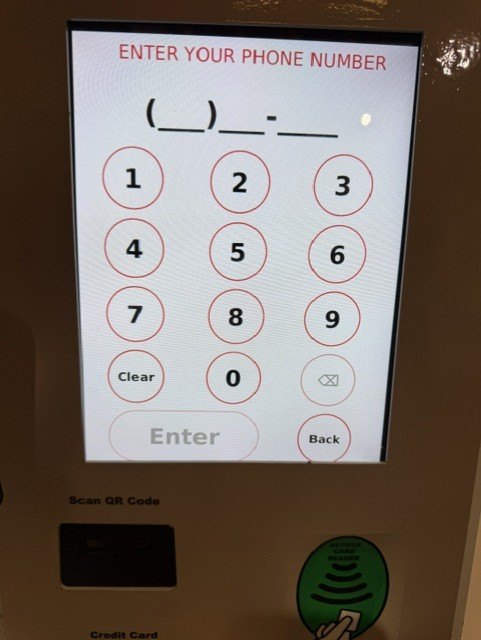
- The number is confirmed. If the customer entered using a phone number, that number is used. If they pulled a printed ticket, they type their mobile number on the kiosk keypad now.
- One message is sent containing a link to that ticket or receipt. Nothing further is sent unless the customer parks again and presses “Text” again.
The key point for compliance: a phone number held for parking-session identification is never messaged on that basis alone. The customer must press “Text” on the kiosk, with “Print” and “No Receipt” equally available, before any message is generated.
The on-screen form
These are photographs of the live equipment showing the web form as the customer sees it. Screen one is the selection step; screen three is the field where the customer types their mobile number.
Wording shown on the form
The form displays:
“Please select how would you like to receive your ticket?”
“Disclaimer: Message and data rates may apply”
Buttons: Text | Print | No Receipt
Sample messages
Ticket, sent on entry
ARCS Parking: Your parking ticket is ready. View it at https://arcsgo.com/t/<ticket-id> Msg&data rates may apply. Reply STOP to opt out, HELP for help.
Receipt, sent on exit after payment
ARCS Parking: Thank you. Your receipt for $30.00 is at https://arcsgo.com/r/<receipt-id> Msg&data rates may apply. Reply STOP to opt out, HELP for help.
How customers stop messages, and how they get help
A customer receives a message only when they ask for one at the kiosk, so there is nothing to unsubscribe from between visits. Standard keywords are nonetheless honoured on our number at all times.
Stopping messages
Replying STOP to any message opts that number out immediately and automatically. No further messages can be sent to it. This is enforced at the carrier and messaging-platform level, so it takes effect at once and does not depend on anyone at our end acting on it.
A customer may also ask any attendant on site, or contact us using the details below, and we will block their number.
Getting help
Every message we send carries our support email and telephone number, so a customer always has a direct route to a person without needing to look anything up. Replying HELP is also supported. Support requests reach us at:
- ACGSupport@acgprotect.com
- 601-939-9295, during the hours shown below
Because these are one-time transactional receipts rather than a recurring programme, help requests are rare and are answered by our support team directly.
What we do with the number
- Where a number was used to enter the facility, it identifies the parking session — the equivalent of a ticket number.
- It is used to send a message only for the transaction the customer pressed “Text” for.
- It is never sold, rented or shared for marketing.
- It is never added to a marketing list, and no promotional message is ever sent to it.
- Handling is described in our Privacy Policy.
Related
- Company
- ARCS Parking
- ACGSupport@acgprotect.com
- Phone
- 601-939-9295
- Address
- 125 Paul Truitt Lane
Pearl, MS 39208 - Hours
- Monday to Friday, 8:00am - 5:00pm Central Time